Video Tutorials
This is the central video library for the TECHNEST 2026 programme.
TECHNEST 2026 has wrapped up — Weeks 1 through 7 are all available below. That's the complete curriculum for this cohort.
Weekly Course Recordings
Recordings of each weekly TECHNEST 2026 session, in order. Each entry links back to the corresponding written handout.
Week 1: AI Developer Toolkit Setup
Mentor introduction, an overview of the AI tooling used throughout the programme (Cursor, Claude Code, Gemini CLI, MCP servers, and friends), installation walk-through, and a first end-to-end build & deploy of a simple personal website.
Read the full written handout: Week 1: AI Developer Toolkit Setup
Week 2: Deploy Your Personal Website
Tech-stack recap from Week 1, a tour of modern UI libraries (Once UI, Magic UI, Shadcn UI, React Bits, Aceternity UI, Radix UI, 21st), the professional Local → GitHub → Vercel CI/CD workflow, deploying the Magic Portfolio Vercel template, and a first lightweight AI clone wired to Gemini 2.5 Flash.
Read the full written handout: Week 2: Deploy Your Personal Website
Week 3: Provision Neon Postgres + Ship a Guest Comments Feature
Create a Neon Postgres database from the Vercel dashboard and link it to your portfolio project, install the Neon CLI and Drizzle ORM, then ship a guest-comments feature on your blog posts — schema design, server actions, and end-to-end wiring. Neon Auth and visitor sign-up / sign-in are reserved for next week.
Read the full written handout: Week 4: Go Full-Stack — Neon + Auth
Week 4: Add Neon Auth Sign-in + Vercel Blob Image Uploads
Picking up from last week's guestbook, wire Neon Auth with Google sign-in into your portfolio, then provision a Vercel Blob store so signed-in visitors can attach images to their comments — server-action upload tokens, client-side preview, magic-byte validation, and end-to-end deployment.
Read the full written handouts: Week 4: Go Full-Stack — Neon + Auth (back half) and Week 5: Image Uploads with Vercel Blob
Week 5: Add a Blog System
What "blogging" means in a Next.js codebase — Markdown vs. MDX as content formats — and two practical paths to a working blog system: (a) lean on the existing blog routes that ship with the Magic Portfolio template, or (b) sign up for Mintlify, connect your GitHub account, and let it auto-provision a dedicated docs repo for you. Plus an Office Hour walk-through of the GitHub profile README repo trick — the username/username repo whose README.md renders on your GitHub profile.
Office Hour Snippet — GitHub Profile README
A short clip from the Week 5 Office Hour: create a repository whose name exactly matches your GitHub username, drop a README.md into it, and GitHub will render that file on your public profile page.
Main Class Recording — Add a Blog System
Markdown vs. MDX as content formats, then two ways to ship a working blog: (1) wire up the blog system that already exists in the Magic Portfolio template, or (2) create a Mintlify account, connect your GitHub, and let Mintlify auto-create a docs repo and deploy it for you.
Read the full written handout: Week 6: Add a Blog System
Week 6: Build a Slack App
What a Slack app actually is and how to build one from scratch — laying the groundwork for the Week 7 handout on wiring real-time Slack notifications into your project. Plus an Office Hour on Claude Code skills: what an agent skill is, a live demo of using Chan's own svg-animation-studio skill to turn a brand logo into an animated SVG, and answers to student questions on job-hunting and choosing a tech stack.
Office Hour Snippet — Claude Code Skills & Logo Animation
An introduction to Claude Code skills (reusable "agent skills" that extend what Claude Code can do), with a recommendation to try Chan's open-source svg-animation-studio skill to build your brand logo and produce an SVG animation from it. The session also covers questions on job-hunting and how to choose a tech stack.
Main Class Recording — Build a Slack App
Start with what a Slack app is and where it fits, then build one hands-on — the foundation for next week's real-time Slack notification workflow.
Read the full written handout: Week 7: Real-Time Slack Notifications
Week 7: Build Your Personal Database & Generate Documents with Typst
An introduction to building your own personal database to centralise and track your projects, skills, experiences, and career data. The second half covers AI-assisted Typst document generation — writing Typst code with AI help and running the Typst CLI locally to compile professional PDF documents: CV, cover letter, meeting agenda, Speaker & Media Kit, and more.
Read the full written handout: Week 8: Generate Documents with Typst
Write a LinkedIn Recommendation for Chan
This was the final session of TECHNEST 2026 — thank you so much for being part of this journey!
If you found the programme valuable and would like to support Chan's work, she would be incredibly grateful for a brief LinkedIn recommendation. Since LinkedIn's recommendation feature can be a little tricky to find, here are the exact steps:
-
Accept Chan's connection request — open LinkedIn and accept it from the "My Network" tab. LinkedIn requires you to be connected before a recommendation can be written.
-
Visit Chan's profile — go directly to linkedin.com/in/chanmeng666
-
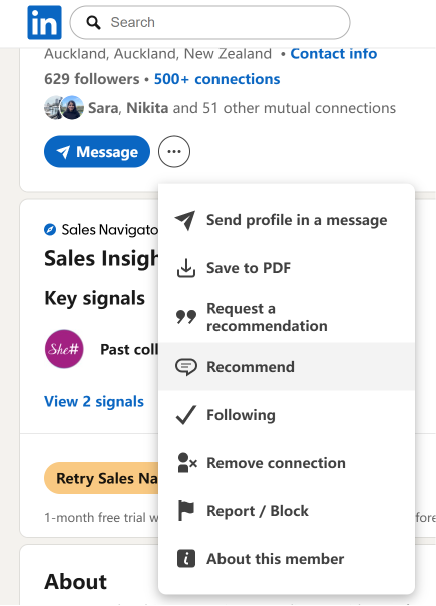
Click "More" — the button (shown as ···) sits just below Chan's profile picture and headline.
-
Select "Recommend" (or "Recommend Chan") from the dropdown menu.
-
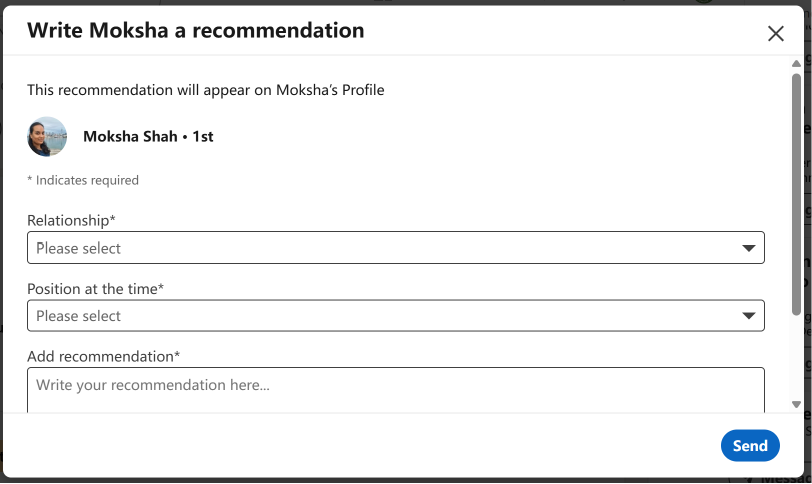
Write your note — a pop-up will appear asking for your working relationship and your recommendation text.
There is absolutely no pressure — but it would mean a great deal to Chan as she continues to build her professional profile.
Browse Existing Tutorial Videos
In the meantime, you can explore tutorial videos from previous programmes — many of the foundational topics are still highly relevant:
- Summer 2025 Video Tutorials — Cursor programming course walkthrough and the professional diagrams course.
- Winter 2024 Video Tutorials — Coze workflow series, AI drawing & LOGO design, and AI conversational system.
- HER WAKA 2026 Video Tutorials — sister programme; videos rolling out throughout 2026.
Other Video Resources
- The Tutorial Video Resource Collection blog post aggregates video walkthroughs across multiple courses.
Stay Updated
- Watch this page for new TECHNEST video drops alongside each weekly module.
- Subscribe to our Newsletter for course release announcements.
- Found something missing or out of date? Please open an issue on GitHub.